Download Kindle Books: One Checkbox Now Decides

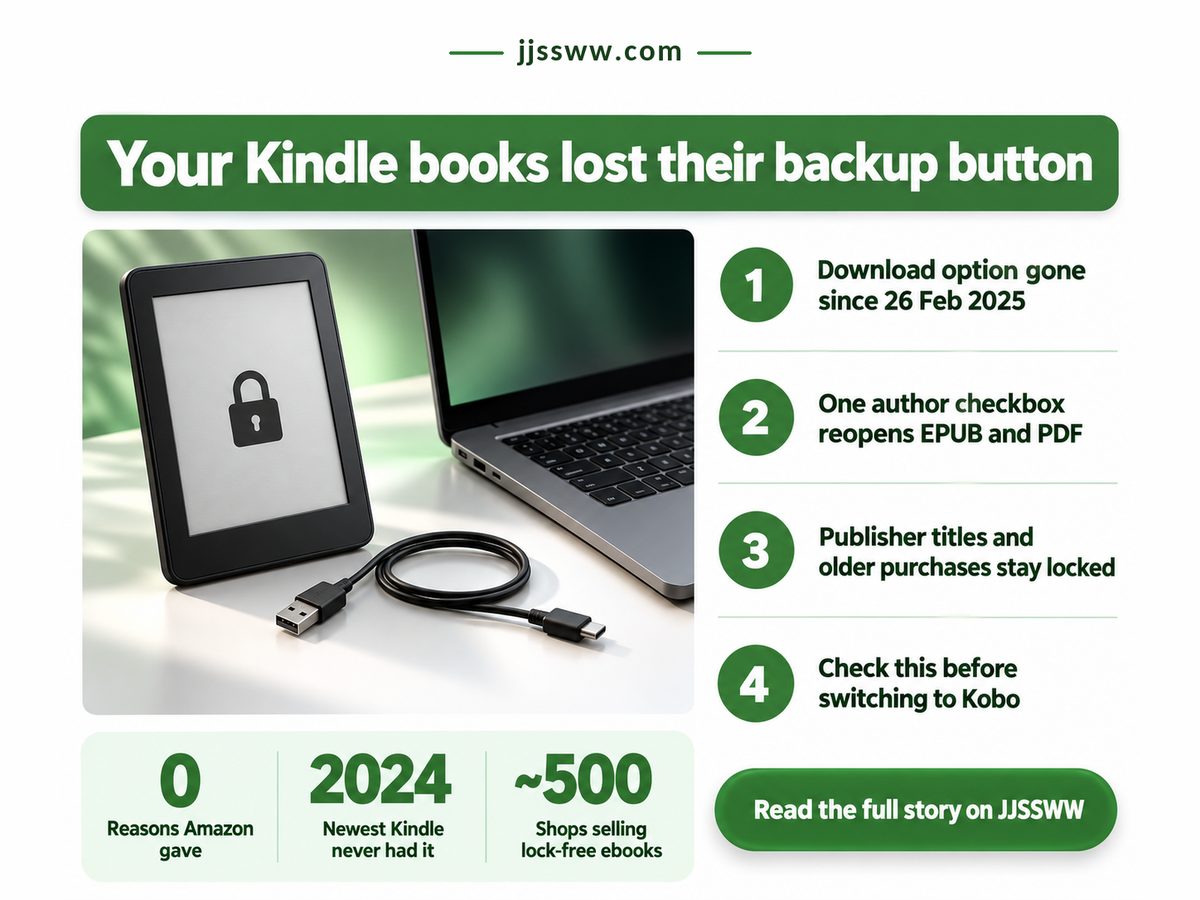
Amazon's website no longer lets you download Kindle books you paid for to your own computer. Not through a hidden menu, not for a fee. "Download & Transfer via USB" went dark on 26 February 2025, and the bill landed on readers who planned ahead, keeping offline backups or hoping to move to another e-reader one day.

E-reader with a padlock beside a laptop, showing why you cannot download Kindle books

Since 20 January 2026 there is a way back, and it is narrow. A self-published author on Kindle Direct Publishing (KDP) can mark a book DRM-free, meaning no copy protection, so buyers can download it as EPUB or PDF. Everyone else's books stay put.

Key Takeaways: most Kindle purchases can no longer be saved to a computer; only self-published books whose authors opt in can be downloaded again.

  • The website download route closed on 26 February 2025, with nothing offered for publisher titles.
  • From 20 January 2026, KDP books marked DRM-free return as EPUB and PDF.
  • Older indie titles stay locked until each author changes the setting.
  • Buying DRM-free at checkout is the only backup a reader controls.

Who pays when the download button disappears?

Readers who treated a Kindle purchase as a file they own pay first, because a book with no local copy can be changed or withdrawn by Amazon and there is nothing on your drive to fall back on.

That is not hypothetical. TechRadar reported in February 2025 that Amazon occasionally removes ebooks or swaps in modified versions, so your copy is whatever Amazon currently serves. Amazon gave no reason for the change. Wi-Fi delivery and USB transfers of files you already hold, via tools such as Calibre, still work. You can still read, just through Amazon's pipe.

The same TechRadar report found that the latest Kindle generation, released in 2024, never offered Download & Transfer at all, so anyone on a current model never had a backup button to lose. Libreture, which relayed Amazon's notice, says some owners saw the option vanish early, cutting a short warning shorter. Whether a Kindle purchase was ever ownership or only a long licence is, in my view, still open. (I say "own" loosely, which is rather the point.)

It is the same shape as the pause button Spotify Premium will not give you: a control that costs nothing to offer, withheld because its absence keeps you inside. India's dark pattern crackdown and its CCPA penalties show regulators starting to price that friction. Four numbers from Libreture's 17 February 2025 post and TechCrunch's 10 December 2025 report, or worked out from them, decide how much of a library you can protect.

Warning before the cutoff

9 days

Too short to save libraries

Cost to reopen an old title

1 checkbox

Your shelf waits on authors

DRM-free ebookshops listed

Almost 500

Places backups stay yours

Publisher titles covered

0%

Bestsellers stay Kindle-only

The checkbox matters more than it looks. TechCrunch reports that older titles do not change automatically: the author must edit each book and accept that past buyers may download it. Authors who have stopped publishing probably never will.

"

Amazon reopened the self-published shelf and left the bestseller shelf shut. If your favourite book came from a big publisher, there is no box for anyone to tick.

Can I still download Kindle books to my computer?

You can, but only when the book is self-published through KDP and its author has marked it DRM-free; publisher titles and older indie books without that setting cannot leave Amazon's apps as a file.

TechCrunch reported on 10 December 2025 that from 20 January 2026, KDP titles set as DRM-free download as EPUB and PDF. The Alliance of Independent Authors (ALLi) wrote on 13 December 2025 that this covers titles published after 9 December 2025, while TechCrunch says older ones change only when the author edits the setting. So new indie books get the option, older ones only if re-opted.

Dimension KDP vs publisher What it means for you
⚖️ Who decides KDP The author, per title
Publisher No opt-in offered
⚠️ Your backup rests on someone else's tick
📊 Files you get KDP 2 formats, EPUB and PDF
Publisher Kindle app or device
✅ Opted-in books open on non-Kindle readers
🔒 Older buys KDP Only if the author re-opts
Publisher Locked since 26 Feb 2025
❌ The shelf you already own stays shut
🌍 Moving to Kobo KDP DRM-free files move over
Publisher Stay in Amazon's app
⚠️ A brand switch keeps only part of a library
🧾 Checks to pass KDP 2: indie, then opted in
Publisher Fails the first one
❌ One no and the file never leaves
🏁 Best suited for KDP Fans of opted-in indie authors
Publisher Readers staying on Kindle
🏁 Buy where the file can leave with you

Every row that helps you depends on a self-published author acting. My own reading reduces the decision to two questions before paying: is this book self-published, and has its author made it DRM-free? A no to either means you are buying access, not a copy.

328 days with no download route. 17 Feb 2025. Notice reported. 26 Feb 2025. USB download ends. 10 Dec 2025. KDP change announced. 20 Jan 2026. Opted-in EPUB, PDF.

If a book is not on the self-published shelf, no date here brings its file back, and even indie readers waited most of a year for any route. Dates from Libreture and TechCrunch; the 328-day gap is our own count from 26 February 2025 to 20 January 2026.

Where the KDP opt-in breaks down

The opt-in breaks down wherever the person who must tick the box is not the person who wants the file, and that gap lands on the buyer every time, never on Amazon or the author.

Amazon could have flipped the setting for past buyers of every DRM-free title at once. Making each author re-open each book is a choice, not a technical limit, and I think it is the wrong one.

The fix behaves like banking apps that cancel subscriptions for only a shortlist of merchants: relief for the names on the list, silence for everyone else. Indie readers got a door; everyone else got a press release.

Can I read Kindle books on a Kobo?

Only the ones that leave Amazon as DRM-free files, which ALLi says can be read on a Kobo. But Libreture notes Kobo uses DRM too, so the common advice to escape by switching brands is out of date: a new device changes where you read, not who controls the file.

  • Books Amazon removes or edits before you save them leave no copy you control.
  • Older Kindles that relied on a cable now lean on Wi-Fi delivery.
  • ALLi and TechCrunch differ on older titles; assume nothing until the author acts.

Your next ebook is backup-safe only if:

  • Its product page names the author or their own imprint as publisher.
  • The author says, on the page or their own site, that it is DRM-free.
  • If you might move to a Kobo, the title is also sold DRM-free elsewhere.

The decision is not Kindle versus Kobo; it is whether your next ebook comes with a file you keep. This week, open your Kindle library, pick the books you would hate to lose and check each publisher line. Email any indie author on that list to ask for the DRM-free box, and buy your next release from a DRM-free shop.

The ChatGPT Family Plan That Google Already Sells

You cannot add your partner to ChatGPT Plus. Or your teenager, or anyone else under your roof. There is no ChatGPT family plan and no member slot, so a household that wants the paid tier signs up once per person, on separate cards, at the full individual price. Who pays for that missing button? Whoever in the house uses AI the most, and then everyone who quietly starts using it after them.

Infographic on the missing ChatGPT family plan with four phones and per-seat costs

Key Takeaways

OpenAI sells no household tier, so families pay per seat, while Google AI Pro covers a whole family for one seat's price.

  • ChatGPT Free, Go and Plus are single-user; the only shared option is Business, a work plan.
  • Four Plus seats cost about $720 a year more than one Google AI Pro plan.
  • Google's sharing stops at the border, and pooled limits let one heavy user drain the rest.
  • Pick by headcount: one heavy ChatGPT user stays on Plus; two or more in one country should share Google's plan.

Who pays when there is no ChatGPT family plan?

Every person who wants paid ChatGPT pays for their own seat, because OpenAI's consumer plans are built for one user each and the only shared option is a work plan sold to businesses. OpenAI's own pricing page, retrieved 8 October 2026, calls Free, Go and Plus "designed to be used by individuals" and lists Business as "available starting at 2 users". So a family wanting one bill must pose as a company.

Streaming settled this long ago with family tiers, flawed as they are; anyone who has tried to pause a Spotify Premium family plan knows the manager holds the power, but at least the plan exists. Prices only move one way, as Peacock and Apple TV both raising prices in August 2026 showed, and a per-seat AI bill multiplies every hike by the people in your home.

Is OpenAI leaving money on the table? Our read is no, at least not yet. Per-seat pricing pays better while demand grows, and a family tier would cannibalise seats households already buy. That is opinion, not disclosed strategy, but it makes waiting a poor budget. The four numbers below come from OpenAI's help center, Google One's family-sharing help page (both retrieved the same day) and OpenAI's community forum; the ratio is our arithmetic.

Price of One Plus Seat

$20/month

Multiplied by every user

Google Family Group Size

5 members

Plus the paying manager

Family Plan Request Open Since

Oct 2024

Still no household tier

Four Plus Seats vs AI Pro

4x

Same home, quadruple bill

Take the group size. It counts people, not devices, and the manager sits outside it, so the real cap is six humans: for most homes, everyone.

"

A household pays OpenAI four times what Google charges for the same idea: AI for everyone under one roof.

Which AI subscription can be shared with family?

Google AI Pro is the one big-name AI subscription here built for sharing, covering a whole family group, while ChatGPT Plus and Copilot inside Microsoft 365 Family each stay locked to one person. AI Pro costs $19.99 a month in the US, the rate Android Authority reported in May 2026. Our arithmetic: that is one cent less than a single Plus seat, about $3.33 a person each month across a full group. The break-even for switching is the second paying user in your house.

Dimension Plus vs AI Pro What it means for you
💰 Monthly bill Plus $80 for four seats
AI Pro one fee, whole group
✅ One charge replaces four
🧾 Yearly bill Plus $960 for four people
AI Pro $239.88 for the group
✅ Saves the price of three seats
🌍 Who can join Plus 1 buyer per seat
AI Pro up to 6, one country
❌ A student abroad keeps a separate bill
📊 Usage limits Plus each seat its own
AI Pro pooled on Flow, Antigravity
⚠️ One heavy user can drain the pool
🔒 Chat privacy Plus 1 login per seat
AI Pro own Google account each
✅ Nobody reads anyone else's chats
⚖️ Account rules Plus logins cannot be shared
AI Pro sharing built into the plan
✅ No account put at risk by sharing
🏁 Best suited for Plus one person who lives in ChatGPT
AI Pro 2+ adults in one country
🏁 Count paying users before you renew

Read the left column alone and the trade is plain: Google wins on money and privacy, then gives ground on who can join and how far the allowance stretches.

25%. of four Plus seats. One AI Pro plan. Kept: 75% of the bill.

If two or more people at home would each pay for Plus, one shared Google AI Pro plan costs a quarter of four Plus seats a year. The full ring is four seats at US list price for 12 months, derived from the prices above.

The catches in every shared AI plan

Sharing a ChatGPT login breaks OpenAI's rules, Google's family group stops at the border, and Microsoft's Family label never covered Copilot, so each workaround carries a cost you should check before you move anyone. OpenAI's Terms of Use, effective 1 January 2026, say you may not "make your account available to anyone else", and a shared login blends everyone's chat history and memory anyway.

Microsoft is the cautionary tale. When it folded Copilot into Microsoft 365 in January 2025, its blog said Copilot for Family subscribers "will be available to the subscription owner and cannot be shared with others", yet the US price still rose $3 a month. Everyone else on the plan paid more for no Copilot.

If you switch, cancel the old seats deliberately; some banking apps can now cancel subscriptions for a shortlist of merchants, so check yours covers them first. Google's plan has its own fine print:

  • The manager must be 18 or older and alone can change the plan or buy extra AI credits.
  • Invitees must live in the manager's country, ruling out a student abroad.
  • On Flow and Antigravity, Google says usage limits are shared by the entire family group.
  • Your ChatGPT chats and memories do not move to Gemini on their own.

Share one plan only if all of these hold

Two or more people at home would each pay for an AI chatbot.

Every user lives in the payer's country.

Nobody relies daily on a custom GPT for work.

One adult will own the account and the arguments about limits.

So here is the decision. This week, count the paid AI seats in your house. One? Keep Plus. Two or more, all in one country? Move the household to Google AI Pro under the adult who already pays the family's bills, invite the others, and cancel the extra Plus seats after a month of real use. Until OpenAI ships a household tier, the missing button is a line item, and you are paying it.

Why You Can't Pause Spotify Premium, and Who Pays

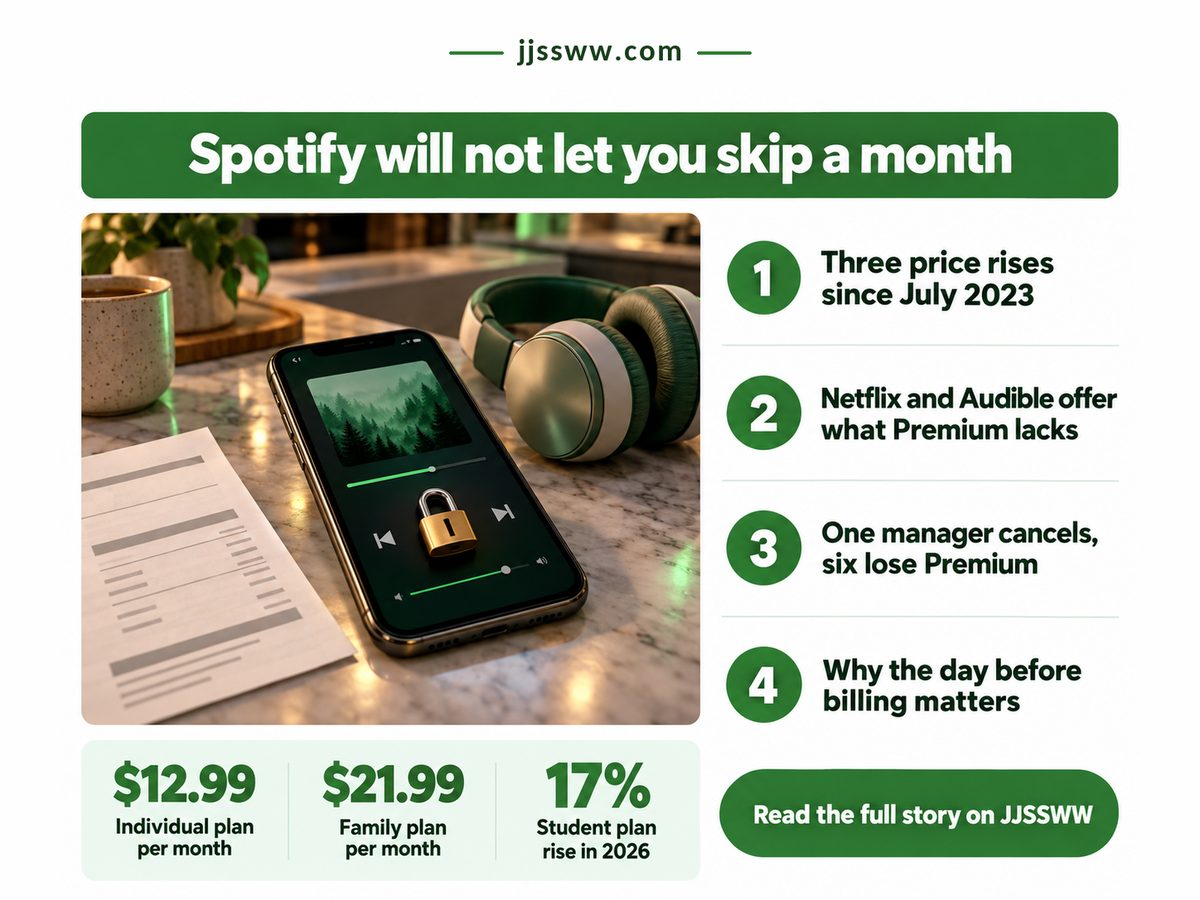
Open Spotify, go to your account, and look for the button that stops your Premium bill for a month while leaving everything else in place. It isn't there. You can't pause Spotify Premium; you can only cancel it. And the person who pays for that missing button is whoever holds the bill, most of all the parent running a Family plan.

Infographic showing you cannot pause Spotify Premium, with prices and a locked phone

Netflix built one. So did Audible. Spotify, which keeps raising its US prices, hasn't, and the gap gets more expensive with every rise.

Key Takeaways: Spotify has no pause, so the only way to skip a paid month is to cancel before your billing date, which is safe for your playlists but not for anyone else on your plan.

  • Premium keeps running until the next billing date, so cancelling early costs you no paid days.
  • Your playlists and saved music stay on the free tier.
  • When a Family or Duo manager cancels, every managed account drops to the ad-supported free plan.
  • A cancelled free trial cannot be restarted, so finish it first.

Can you pause Spotify Premium?

No, Spotify Premium has no pause option: Spotify's own cancellation help lists only cancelling or switching plans, so skipping a month means cancelling and later subscribing again at whatever the price is by then.

That last clause is where the missing button starts to cost real money. A January 2026 SoundGuys report on Spotify's latest US increase lays out the history: Premium sat at $9.99 from 2011, then went up in July 2023, in July 2024 and again from February 2026 billing dates. By my arithmetic the Individual plan now costs 30% more than it did before mid-2023, so every month you can't skip is a dearer month than it used to be.

The usual advice is to keep paying, because cancelling feels like losing something. That advice is out of date. Spotify's cancellation page (retrieved 5 October 2026) says Premium runs until your next billing date and you keep your playlists and saved music. For a solo listener, cancelling costs almost nothing.

Spotify isn't alone in leaning on inertia: think of the Peacock and Apple TV price hikes ten days apart this August, or the scattered Google subscriptions that keep running because each bill is too small to chase.

Four numbers decide whether a break is worth it. Three come from that SoundGuys report, the fourth from Spotify's cancellation rules.

Premium Left After Cancelling

Up to 1 month

Paid days are never forfeited

Individual Plan, Monthly

$12.99

$155.88 a year, no breaks

Accounts on One Family Bill

Up to 6

One cancel moves them all

Student Plan Price Rise

17%

Hardest on the tightest budgets

The figure on Premium after cancelling matters most, because it removes the fear of losing paid time. Cancel early in your cycle or late; the only thing timing changes is whether the next charge goes through.

"

Spotify charges $12.99 every month and offers no button for the month you don't need. That is a pricing decision, not a technical limit.

So the real choice isn't pause versus cancel. It's cancel versus paying through months you won't use, and the answer depends on which plan you hold.

What happens when you cancel Spotify Premium?

When you cancel, your paid access continues until the next billing date, then the account turns free and ad-supported, keeping your playlists and saved music but dropping any managed Family or Duo members as well.

The table prices that choice plan by plan, at the February 2026 rates SoundGuys reported. The cost figures are my own arithmetic: the monthly price times the months you would not use.

Dimension Cancel vs Keep paying What it means for you
💰 Family, 2 months Cancel $0
Keep $21.99 x 2 = $43.98
✅ The largest plan saves the most
💰 Duo, 2 months Cancel $0
Keep $18.99 x 2 = $37.98
⚠️ Only worth it if both of you agree
💰 Solo, 3 months Cancel $0
Keep $38.97
✅ What a three-month pause would save
📊 Playlists Cancel kept on free tier
Keep kept
✅ Your library survives the break
🔋 Offline play Cancel ads, no downloads
Keep ad-free, downloads
❌ Commutes and flights get worse
🧾 Family members Cancel all move to free
Keep unchanged
❌ Your break becomes everyone's break
⏱ Free trial Cancel cannot be restarted
Keep turns into a paid plan
⚠️ Stop only after you finish testing
🏁 Best suited for Cancel breaks of 1 month or more
Keep plans where others object
🏁 Solo plans win; shared plans need a vote

For one person, cancelling is close to free. For a household the saving is bigger, and so is the damage.

Which streaming services let you pause your subscription?

Several do, which suggests Spotify's omission is a choice.

Netflix. Up to 3 months. Not on Basic plans. Audible. Up to 3 months. Listed, Sep 2026. Hulu, YouTube TV. Pause offered. Sling TV as well. Spotify. No pause. Cancel or change plan.

If you want to stop paying for a while without closing your account, Spotify is the one service here where cancelling is the only route. Sources: Netflix Help Center and SubTracker's September 2026 roundup (retrieved 5 October 2026), which is not exhaustive, plus Spotify's cancellation help.

The Spotify family plan price of one person's break

The heaviest cost of a missing pause falls on whoever manages a Family or Duo plan, because one cancellation moves every managed account to the free, ad-supported tier, whether the others wanted a break or not.

Spotify's support page is blunt: if the plan manager cancels, managed accounts move to the free plan. That means ads and no offline downloads for a teenager on a school trip because a parent saved a month's fee. A pause would avoid that.

Free trials carry their own trap. Spotify says zero-priced trials can't be reactivated once cancelled, so cancelling early to be safe throws away the rest. Here I part company with the standard advice to cancel every trial on day one: with Spotify, set a reminder for the day before it ends. Some banks now let you cancel a subscription from the bank app, though only for a shortlist of merchants.

Will Spotify ever add a pause? My read, and it's opinion, is that the people who would use one are exactly the subscribers Spotify most wants to keep billing. I'd like to be wrong.

  • Cancel after your billing date and one more charge has already gone through.
  • Family and Duo members lose Premium together, never one at a time.
  • Coming back means paying whatever the price is then.

Cancel this month only if all of these are true for you

  • You pay for an Individual plan, or everyone on your Family or Duo plan has said yes.
  • You expect to skip at least one full billing cycle.
  • You are not inside a free trial you still want to use.
  • You can live with ads and no offline listening until you come back.

Open Spotify's account page today, note your next billing date and set a reminder for the day before. If the card above describes you, cancel then: you keep every paid day, your playlists wait, and the next charge never arrives. If not, keep paying.

Related: why there is no ChatGPT family plan, even though Google shares Gemini

Cancel Subscription From Bank App? Only Sometimes

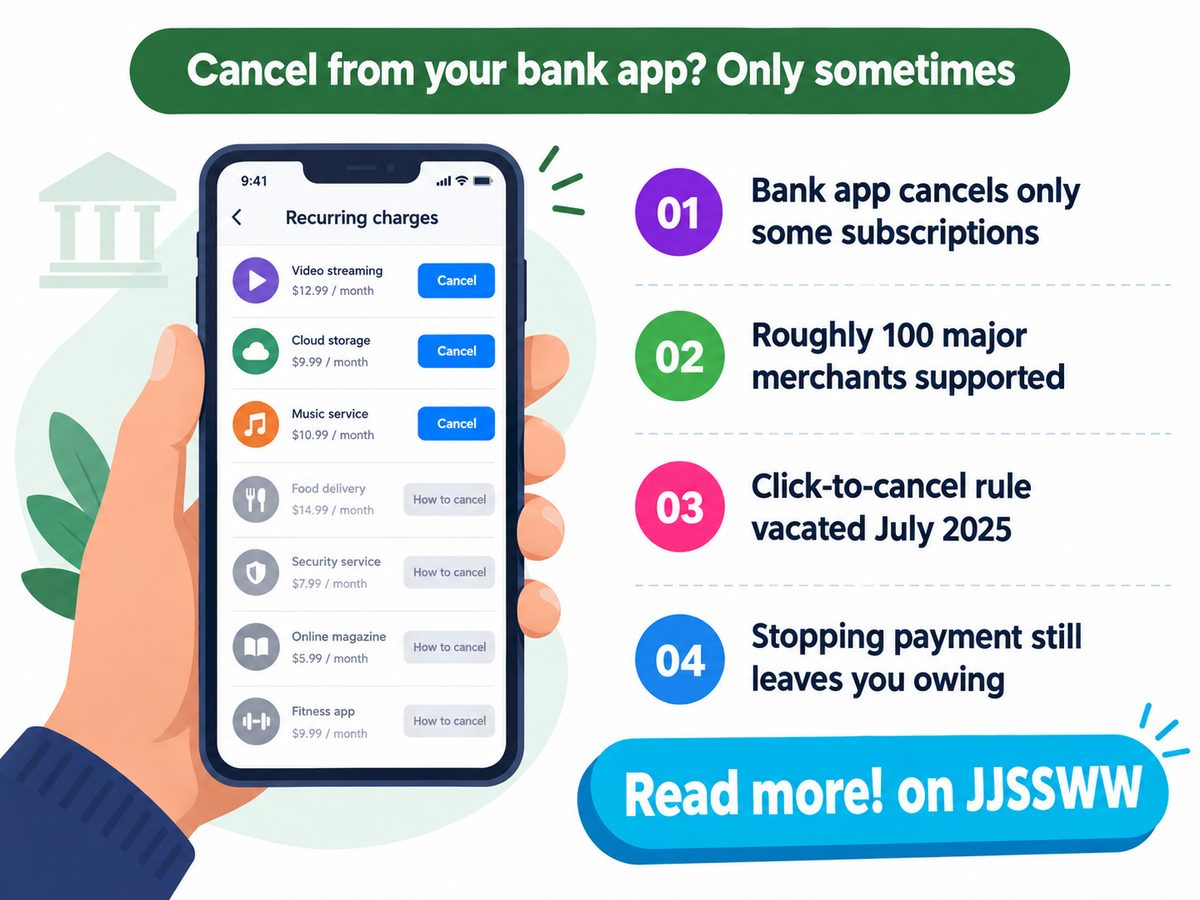
Open your banking app and try to kill a charge from inside it. For most of the subscriptions sitting on your card, the app will not let you. It shows the charge, sometimes a tidy list of every recurring payment, then hands you instructions pointing back at the merchant's own website. That is the missing feature, and you pay for it in the months between spotting a charge and actually stopping it. Cancel subscription from bank app works now, but only sometimes, and only for names big enough to make a list.

Cancel subscription from bank app panel showing listed and unlisted recurring charges

Key Takeaways: your bank app can end some subscriptions for you, and the rest are still your job.

  • Visa's cancel panel reached North American issuers through summer 2026, one bank at a time.
  • Coverage is a merchant list, so anything off it gets instructions rather than a cancellation.
  • No federal rule has forced merchants to accept your exit since July 2025.
  • Blocking a payment is not ending a contract, and you still owe the money.

Can your bank cancel a subscription for you?

Sometimes, and only if your card network and your issuer have both shipped the feature and the merchant sits on their supported list, which covers big names rather than the whole of your monthly billing.

Visa announced Enhanced Subscription Manager on 26 March 2026 and said it would reach North American financial institutions through summer 2026, with Latin America and the Caribbean to follow. Inside the banking app you can see every recurring payment, and for a listed merchant you can end it outright. The button therefore arrives on your bank's schedule rather than yours, so two neighbours paying the same streaming bill can have completely different options this month.

This is a deposit retention feature before it is a consumer protection. Or rather, it is both, and the order matters, because the merchants big enough to make someone switch banks get wired in first and the small biller you forgot about does not. Anyone who has watched streaming price rises land quietly on a card statement already knows which charges go unnoticed, and they are rarely the famous ones.

And the reason your bank is offering this rather than the merchant being made to accept your cancellation is that the federal version died. The Eighth Circuit vacated the FTC's click to cancel rule on 8 July 2025 in Custom Communications v. FTC, because the agency skipped the preliminary regulatory analysis required once its own judge found the rule would cost the economy more than $100 million. It had been due to apply on 14 July. So the exit right you were within a week of having never applied at all, and the substitute is a product feature your bank can scope however it likes.

Put those dates next to the rollout and you get the figure that actually describes your position: roughly twelve months ran between the death of the federal exit right and the first in-app cancel buttons, and longer if your issuer sits in a later wave. That subtraction is ours, not a finding from either source. Four other numbers decide whether you can hand the audit to your bank at all, and they come from the court timeline above, the FTC's Amazon refund program, Mastercard's October 2025 work with U.S. Bank, and Deloitte's 2026 Digital Media Trends, fielded in late 2025 with 3,575 respondents.

Federal cushion

6 days

Your exit right never applied.

Price of blocked exits

$2.5B

Repaid years after billing.

Charges per person

8+

More billers than any list.

Yearly churn rate

40%

You quit something most months.

Churn at that level is the part people underestimate. Leaving a service is not an annual chore you can batch, it is a habit, and a panel covering part of your stack means carrying two systems in your head: the one where a few taps end a charge, and the one where you log in somewhere else and hunt for a confirmation email. Anyone already paying for subscriptions scattered across one company's products has met the second system. My own read, and it is a stance rather than a finding, is that issuer merchant lists will grow slowly once the retention win is banked, so I would not wait for yours to cover everything.

"

Six days. That is the entire life of a federal right to cancel the way you signed up, which is why the exit you use now belongs to your bank instead of to you.

Cancel subscription from bank app: what works and what does not

Two paths sit behind one panel, and the difference is whether the merchant is on your network's supported list, because a listed merchant gets a real cancellation while everything else gets a guided workflow you finish yourself.

The table sets the two paths against each other, using the numbers each network has published plus one threshold that is ours rather than theirs. Read the last column first if you are in a hurry.

CategoryListed merchant, cancel in appEverything else, guided workflowWhat it means for you
Coverage100 plus major merchants via Visa's Digital Enablement SDKThousands of smaller billers, instructions onlyOpen the panel and check before you trust it with a charge
Network reachMastercard with U.S. Bank: hundreds of participating merchants since 15 October 2025Any biller outside those dealsYour card brand decides the option, not the service you pay
Proof of exitStatus shown in the app, usually same sessionOnly the merchant's own confirmation countsSave the email or you hold no evidence at all
Why it exists72% want to manage subscriptions in banking app menusMerchants keep the exit on their own termsCoverage stops where the deposit win stops
Legal backingNone, a product feature your issuer can withdrawState law only: California since 1 July 2025, plus New York and MassachusettsOutside those states your exit is whatever is offered
Contract effectEnds the recurring payment mandate on the cardEnds the agreement only once the merchant records itStop a charge without cancelling and you still owe the balance
Exit trigger$5 on a $69 monthly bill, about 7%, is where 61% say they quitSame trigger, slower exitPrice rises reach you faster than the button reaches your bank
Best suited forAnyone whose biggest charges are household namesAnyone billed by small services and app storesMost people need both paths, so keep your own list

Read down that last column and the pattern is blunt. The panel is genuinely useful for the handful of charges that are household names, and close to useless for the ones you are most likely to have forgotten. Which is backwards. Forgotten charges are the expensive ones.

Refunds ordered for failed cancellations: $1.5B. $845M paid by September 2026. $655M still waiting. Share that has reached customers: about 56 percent. Time since the settlement: about one year.

Waiting for a regulator to give you your money back is not a cancellation plan, because a year after the largest order of its kind barely half the money had reached people. Figures come from the FTC's Amazon refund program, and the 56 percent share plus the unpaid remainder are our own arithmetic.

Where the in-app cancel button leaves you exposed

The exposure sits in the gap between stopping a payment and ending an agreement, because your bank can block the money while the merchant keeps billing you on paper and eventually sends the balance to collections.

How to stop automatic payments without leaving a debt behind

The CFPB is blunt about the order of operations. Revoke the authorization with the company, then tell your bank in writing. Keep copies of both. A stop payment order can carry a fee, and the agency's own guidance says cancelling an automatic payment does not cancel what you owe. So the cancel button is only ever as good as the merchant's willingness to record the request, which is precisely the duty the vacated rule would have imposed. Regulators have started treating that friction as a design choice rather than an accident, which is the thinking behind the dark pattern rules now aimed at cancellation flows.

Scale the problem up and you reach the Amazon case. The FTC's settlement covers customers who tried to cancel through the online flow and could not, in a window running from 23 June 2019 to 23 June 2025, six years in which every charge cleared on time while the refunds did not exist yet. Signing up keeps getting easier too, and shopping agents that hold your card details will happily add one more mandate you did not diary.

  • Your issuer may not have switched the panel on, so check it before you rely on it.
  • App store billing sits outside your card, which puts it beyond the panel's reach.
  • A cancellation the app marks as done is not proof; the merchant's email is.
  • A stop payment can cost a fee and still leave the agreement running.

Four things to check about your own account this week

  • Your banking app shows a recurring payments screen, and a cancel control actually appears on it.
  • The service you want gone bills your card directly, not through an app store account.
  • Your state has an auto renewal law you could cite if the merchant argues.
  • Your last cancellation left a written confirmation you can still find today.

So do the work the panel cannot. Open your bank app this week, write down every recurring charge it lists, and mark the ones it will not cancel for you, because those are the ones needing an email trail and a date in your calendar. The decision in front of you is narrow: either you keep your own cancellation list, or you accept that part of your stack bills on until you happen to notice. Keep the list.

TRAI Complaint Online, And Who Actually Fixes It

Your broadband has been dead since Thursday. You have called the helpline four times, been promised a technician twice, and nobody has come. So you do the sensible thing and search for how to file a TRAI complaint online, because TRAI is the regulator and regulators fix things. That search is where most people lose the next three weeks.

Escalation ladder diagram showing the trai complaint online route from operator to appellate authority

Here is the sentence that changes the plan, and it sits on TRAI's own FAQ page: "It is clarified that individual consumer complaints are not handled by the TRAI." Not a policy position buried in an annexure. One plain line on the regulator's website. TRAI writes the rules your operator has to follow and audits whether they followed them. It does not read your ticket, or rather, it reads the aggregate of everyone's tickets once a quarter, which is a very different thing from reading yours.

A complaint filed at TRAI does not go to TRAI, and it never has.

  • Your operator's complaint centre is the only body with a deadline to fix your problem.
  • When that deadline lapses, the appellate authority inside the same operator is your second and last regulated step.
  • A draft amendment dated 7 May 2026 would fine an operator every single time it closes a complaint improperly.
  • That draft has not been notified. Until it is, you are working the rules written in 2012.

How Do You Complain To TRAI, And Where Does It Go?

You do not complain to TRAI. You complain to your operator's complaint centre, which owes you a resolution inside three days where no other quality of service timeline applies, and then to that operator's appellate authority.

That distinction sounds like bureaucratic hair splitting until you look at how many people trip over it. In Semrush's India database, retrieved on 7 September 2026, the phrase "trai complaint" pulls roughly 3,600 searches a month and "trai complaint online" another 880. Most of those people are typing the name of the one organisation in the chain that will not act on their case. They are not being stupid. They are being logical, and the system is not.

The standard advice on consumer forums is to escalate to TRAI when your operator stonewalls you. It is wrong, and it has been wrong since the parent regulation was notified on 5 January 2012. What TRAI actually gives you is a map: the Telecom Consumer Complaints Monitoring System lists every operator's complaint centre and every appellate authority, circle by circle. A map is useful. It is not a judge.

This has the same shape as the enforcement gap behind India's dark pattern crackdown and what it actually changed for online shoppers. A rule exists, the body that enforces it sits somewhere the consumer does not expect, and the distance between those two facts is where people give up. Billing disputes follow the pattern too, which is why the specific dates behind staggered streaming price increases and when your bill actually changes end up mattering more than the headline price.

The numbers below are the ones worth holding on to before you decide how much of your week this is worth.

Age of the ladder

14 years

Unchanged since January 2012

Late report ceiling

Rs 10 lakh

Cap on delay charges, draft

Monthly searches

3,600

For "trai complaint" in India

Daily meter

Rs 20,000

Per day after the first fortnight

The money that will actually change operator behaviour is not the per case fine. It is the daily meter on late quarterly performance reports, because that one runs whether or not a single consumer complains. A per complaint charge only bites when somebody appeals and wins. A reporting clock bites on a calendar, which is much harder to manage away, and finance departments respond to calendars.

"

TRAI says it in one line on its own website: individual consumer complaints are not handled by the TRAI. Every wasted week that follows starts with not reading that sentence.

So what would actually change if the draft on the table becomes law?

What A TRAI Complaint Online Costs You In Days

Under the rules in force, a complaint that runs the full distance can take about 72 days, and up to 132 if the appeal window is extended. The draft compresses that to about a month.

The document is formally the Telecom Consumers Complaint Redressal (Fourth Amendment) Regulation, 2026, dated 7 May 2026, and stakeholder comments closed on 5 June 2026. It leaves the two tier structure alone and goes after the two things that make the structure fail in practice: how easily you can get a complaint registered at all, and what it costs an operator to close one that should have stayed open.

What ChangesIn Force TodayDraft Of 7 May 2026
DecisionOperator's complaint centre, then that operator's appellate authorityUnchanged, and TRAI still decides no individual case
ChannelsFive: IVRS, web portal, email, post, in personSeven, adding a mobile app and chatbots or AI agents
ComplaintNo penalty specified for closing one improperlyRs 1,000 for each improperly dismissed complaint
AppealNo penalty specified for dismissing one improperlyRs 5,000 for each improperly dismissed appeal
CeilingNone, because no per case charge existsRs 50 lakh per licensed service area per quarter
ReportingNo standing duty to publish complaint performanceA Consumer Corner carrying quarterly performance reports and survey results
Best Suited ForA complainant with up to three months of patienceA complainant who needs an answer inside one month

Those totals are our own arithmetic, not a figure TRAI publishes. Add the three day resolution window to the thirty day appeal window and the roughly thirty nine days the appellate authority currently takes, and you get about seventy two days end to end. Stretch the appeal window to its ninety day maximum and the same journey runs past four months. The draft cuts the appeal window to fifteen days and caps the appellate decision at fifteen more, so the same journey lands near thirty three. The trade is real and it is not free: you gain speed at the far end and lose half the time you had to notice the deadline in the first place.

Day 0. Day 3. Day 18. Day 33. You file, docket number issued. Operator's own deadline lapses. Last day to file your appeal. Appellate ruling falls due.

Day markers are our arithmetic on the limits stated in TRAI's Draft Telecom Consumers Complaint Redressal (Fourth Amendment) Regulation, 2026, dated 7 May 2026.

How Do You Register A Complaint Against Airtel Or Jio?

The same way for either one. Every licensed operator has to run a complaint centre and name an appellate authority for each licensed service area, and you can look both up on TRAI's TCCMS portal before you file anything.

The brand on the bill changes nothing about the procedure, which is the useful part and also the frustrating part. There is no shortcut for a big operator and no penalty box for a bad one, at least not yet. What varies is how easy each company makes it to reach a human, and that variation is precisely what the draft's Consumer Corner would expose to anyone willing to read a quarterly report.

Worth saying plainly: I think the appeal window cut is the weakest idea in the draft. Fifteen days sounds tidy on paper. In practice a complaint that was quietly closed while you were travelling can burn most of that window before you notice, and the fix costs nothing to write. Keep the thirty day window and cap the decision at fifteen. You would get the speed without moving the risk onto the person with the least information, which is the same imbalance running through the case for and against handing AI shopping agents your wallet. The pattern repeats wherever a process is designed by the party that already knows how it works. Subscription billing does it too, as Google's scattered subscriptions and what they quietly cost shows.

Four things to watch for once you are in the process:

  • A ticket marked resolved without your agreement still starts the appeal clock. The draft would make the confirmation message and its survey link the marker of closure, which helps only if you actually read the message.
  • The appellate authority sits inside the operator. It is not independent and there is no separate ombudsman waiting behind it.
  • Consumer courts stay open to you, but that is a different process with its own fees and calendar, and the telecom ladder does not feed into it.
  • If the problem is unwanted calls or messages, that runs on the Do Not Disturb rules and a separate register, not on this ladder at all.

Do these before you need any of it.

Ask for the docket number. Say it out loud on the call. Without one, nothing you claim later carries a date.

Write down the filing date. Every deadline in the current rules and in the draft counts forward from that one day.

Keep the closure message. The draft turns an improper closure into a chargeable event, so that message becomes the case.

Do one thing this week, before anything breaks. Open TCCMS, find the appellate authority listed for your operator in your circle, and save the name and address where you will find it in a hurry. The ladder only works for people who know it exists, and the regulator has spent fourteen years assuming you would look it up.

Peacock And Apple TV Price Hikes: When Your Bill Changes

Your card gets charged on a date you picked once and then forgot. That date is now the only thing that matters about the two streaming price increases that landed this month, because it decides whether the higher rate reaches you next month or months from now. Both companies announced. Neither made the part you actually need obvious.

Peacock And Apple TV Price Hikes: When Your Bill Changes

TL;DR: Peacock raised every tier first, and Apple followed before the month ended, lifting Apple TV and Apple One Individual. New subscribers pay at once, but existing ones are grandfathered on staggered schedules, so your billing date, not the announcement, decides when the increase reaches you.

Why It Matters

Peacock moved first, on August 18, lifting every tier it sells, from the cheapest ad-supported plan upward. Apple went on August 28, taking Apple TV up and pulling Apple One Individual along with it. The Family and Premier bundles had already absorbed their own increase back in July, which means Apple repriced its bundle twice inside a single quarter and most bundle subscribers will only ever see one of those changes announced.

The standard response is to cancel something. That advice is mostly noise. Dropping a service you actually watch to save a couple of dollars is a bad trade, and the churn-and-return dance burns more attention than it recovers in money. The lever that works is duller: knowing the exact date the new rate hits your account. Both companies have handed subscribers a window, and both have buried it.

Those windows are not the same length. Peacock's own price notice sets one fixed cutover in September for the entire base, after which current subscribers move to the new rate at their next bill, with annual and promotional rates held until renewal. Apple's approach is looser. Existing subscribers get told roughly a month before the higher charge posts, so your notification date depends on when you originally signed up rather than on a fixed cutover the whole base shares. Variety counted the August move as NBCUniversal's fourth Peacock increase in four years, which is the detail that reframes everything else: this is a schedule, not an event. The scale is easier to read stacked up.

Gap between announcements

10 days

Peacock first, Apple second

Added yearly cost, both ad-free

$60

If you stay on monthly

Apple TV increases since 2019

4

Macworld's running count

Peacock Premium's jump

18%

In one single step

That Peacock percentage is the one to sit with. A move of that size on an ad-supported plan is not an inflation adjustment, it is a repositioning, and it drags the ad tier up toward what ad-free money bought two years ago. Ads used to be what you accepted in exchange for a discount. They are turning into what you accept in exchange for a smaller increase.

How a price change is presented, and how much warning it carries, is exactly the territory regulators have begun policing in other markets. India's dark pattern crackdown on drip pricing and forced subscription design went after presentation rather than the price itself, on the reasoning that a charge you did not see coming is a different product from one you agreed to.

"

Ten days is not a pricing cycle. It is a drumbeat, and the only thing standing between you and the next one is a billing date nobody ever asked you to watch.

What Each Service Actually Costs Now

Side by side, these two are not competing on the same axis, which is why comparing headline prices alone walks people to the wrong answer. One sells a laddered catalogue with an ads discount. The other sells a single tier and a bundle, and has no cheap door at all.

Dimension Peacock Apple TV
Ad-supported entry Select now $8.99, was $7.99 No ad tier sold at any price
Ad-free monthly Premium Plus now $19.99 $14.99, up two dollars
Middle tier Premium with ads now $12.99 None; one tier is the whole menu
Annual plan Existing annual rates hold to renewal $119, raised from $99
Your charge date First bill after September 17, 2026 Notice about 30 days before charge
Bundle knock-on No NBCU bundle repriced this round Apple One Individual now $21.95
Prepay math New annual rates not published yet A year costs about 8 monthly bills
Best Suited For Sports viewers who prepay before September F1 and MLS fans already inside Apple One

The row that decides things is the charge-date row. Peacock published a fixed calendar date, which is unusually clean of it. Apple published a rolling one, which is unusually easy to miss, and a rolling notice tied to your signup anniversary is functionally a notice most people will read after the money has already moved.

Set the two new ad-free rates against a fixed monthly streaming budget and the crowding shows up immediately.

40% 30% Left Peacock ad-free · Apple TV · Everything else

Against a fifty dollar monthly streaming budget, those two ad-free subscriptions alone now take seventy percent of it, leaving less room for a third service than either company's headline increase suggests.

Friction Points

Grandfathering reads as courtesy and functions as risk management. Spreading the change across months of billing anniversaries means no single week shows a cancellation spike, which makes the increase easier to absorb internally and harder for anyone outside to measure. That is a legitimate way to run a business. It is also why the deadline that matters to you is never the one in the press release.

The annual plan is the obvious hedge. Or it looks obvious, until you notice you have prepaid twelve months of a service you open twice, on the strength of a catalogue that has not been announced yet. Locking a rate is only a win if you would have paid every one of those months anyway, and for a second or third streaming service most people cannot honestly say that. Prepaying to dodge one monthly increase while committing a year of spend is the kind of maths that feels shrewd and rarely is.

There is a genuine grey area worth admitting here. Apple has been buying real rights since its last increase, Formula 1 from October 2025 and Major League Soccer from February 2026, both folded in at no extra charge. Whether that earns two increases inside twelve months is a judgment call rather than a fact, and I do not think the content argument is settled either way. Harder to defend is the asymmetry in notice. Regulators moved quickly on device claims when the FDA loosened clearance rules for blood-pressure estimates on wearables, while the standard for telling a paying subscriber their price is about to change remains whatever each company decides it should be.

  • Annual and promotional rates hold only until renewal, so the increase is deferred rather than avoided.
  • Apple One Individual moved together with Apple TV, so bundle subscribers absorb a change that was never announced as a bundle change.
  • Cancelling after your renewal posts does not claw the charge back; the window shuts on your billing date, not on the announcement date.
  • Peacock's fixed cutover and Apple's rolling notice are two different deadlines, so checking one tells you nothing about the other.

Key Takeaways

Find the renewal date first. Every other decision here is downstream of it, and it is the one number neither announcement gave you.

Decide before the notice lands. By the time an email arrives, the charge is already queued against a date you cannot move.

Ask the renewal-price question. If you would not sign up today at the new rate, keeping the subscription is a habit, not a choice.

Open your account settings tonight and write down two dates: when your Peacock bill posts, and when your Apple TV or Apple One charge renews. That is the entire decision. Everything past those two dates is commentary on a price you have already agreed to pay.

Keep reading

Related: why you can't pause Spotify Premium, and what cancelling costs instead